CleanPro
- 3.6
- Rating
- 100.00K
- Installs
- Free
- Price

 Analysis by App-foxy
Shared phones and tablets have a way of becoming storage puzzles. One person saves videos, another installs games, and a third keeps downloading documents until the device starts warning everyone about low space. I tested CleanPro as a practical answer to that problem, and I found its purpose easy to understand: it is a free tools app from AJ IT Solutions that helps inspect storage, identify large files, and bring installed apps into a more manageable view.
That sounds simple, but simplicity matters when several people use the same device. A complicated cleaner can create more arguments than it solves, especially when one person deletes something another person still needs. My overall impression is that CleanPro works best as a decision-making tool for shared storage, rather than as a button you press blindly and forget about. It can help reveal what is taking up room, but the final decision about what stays should remain with the person who owns or manages the device.
How CleanPro fits into a shared household device
Imagine a family tablet used for school files, streaming downloads, photos, and casual games. The storage warning appears just before a child needs to download an assignment or a parent wants to save a trip video. In that situation, I would open CleanPro first and use its storage view to locate the biggest items instead of guessing from the home screen.
You May Also Like

 Blood Strike: 2.5 Anniversary
Blood Strike’s Loadouts Turn Every Drop Into a Tactical Gamble
A close look at Blood Strike’s custom loadouts: how fast access to signature weapons reshapes its battle royale rhythm, rewards preparation, and narrows the gap between fights.

 Pandora - Music & Podcasts
Pandora’s Music Is Easy to Start, but Harder to Recover
Pandora’s strength is its low-effort path from a seed to a station. Its weak spot is how much confidence it asks you to place in connection, setup, and quiet recovery.

 8 Ball Pool
 Is Built on Rivalries, Rematches, and Routine
A close look at the rivalries, rematches, shared routines, and unanswered safety questions that turn a quick pool match into a persistent mobile community.

 Samsung Music
’s Quiet Strength Is Playing What You Already Own
Its reach comes less from spectacle than from dependable access to a personal library. That simplicity is both the app’s strongest retention engine and its ceiling.

 AccuWeather: Weather Radar
AccuWeather Review: A Quick, Clear Forecast for Everyday Decisions
For everyday plans, the best forecast is the one you can understand quickly. AccuWeather makes rain timing, radar, and local conditions easy to act on, with a few trade-offs.

 Hill Climb Racing
Why Hill Climb Racing Still Turns Crashes Into One More Run
A tiny car, a bumpy hill and one more upgrade: Hill Climb Racing keeps resurfacing because its simple chaos makes every near-miss feel personal.
More From Our News Desk



The useful part is not merely finding “junk.” Large files are often perfectly legitimate: an offline film, a folder of photographs, a screen recording, or a forgotten installation package. CleanPro’s value is that it gives you a place to review those heavy items together. I would sit with the household member who created them, explain what is taking space, and remove only what everyone agrees is no longer needed.
This makes the app particularly suitable for a shared Android device where storage responsibility is unclear. It can turn a vague complaint—“the tablet is full again”—into a short conversation about specific files and apps. That is a more sensible workflow than deleting the newest items simply because they are easy to spot.
There is also a useful distinction between storage cleaning and personal organization. CleanPro can help you see what occupies space, but it does not replace a family agreement about where important files should live. If school documents, work material, and personal photos are mixed together, I would first decide which folders belong to which person. Cleaning before that conversation risks removing something that only looks disposable from the outside.
What I would check before touching the delete option
My first pass would be observational. I would open the storage tools, note the largest categories, and avoid making changes until I knew who used the device last. This is especially important on a tablet that moves between bedrooms, a living room, and a home office. A large file may be a temporary download, but it may also be the only copy of something valuable.
I would then review files one group at a time rather than selecting everything in a single session. Large videos are usually easier to judge than documents, because their purpose is more obvious. App organization deserves a slower review: a game that has not been opened recently may still be important to a child, while an unused utility may be safe to remove. The safest cleaning habit is review first, deletion second.
Another practical tip is to use CleanPro before the device reaches its limit, not only after an emergency warning. When there is still some breathing room, you can ask questions, copy important files elsewhere, and make deliberate choices. Waiting until a download is blocked encourages rushed decisions, which is exactly when shared devices are most likely to lose something someone wanted to keep.
Setup boundaries matter more than the first scan
CleanPro is rated for Everyone, which makes its basic purpose approachable for a broad household audience. That does not mean every user should operate it without guidance. Storage cleanup is an age-neutral task in appearance, but the consequences are not age-neutral. A young user may understand that an item is large without understanding that deleting it can remove a saved memory or an offline resource.
For that reason, I would make a simple household rule: children can help identify what is taking up space, while an adult or the file owner confirms deletion. This is not a criticism of the app; it is a sensible boundary for any tool that can influence personal data. The app can support a conversation, but it cannot know which family memory matters most.
On a device used by several people, I would also avoid treating the app as a private diary of everyone’s activity. A storage review can expose personal photos, downloaded media, or documents that another household member did not expect to discuss. The person managing the device should explain what will be reviewed and why. That small amount of coordination makes the process feel cooperative rather than intrusive.
CleanPro is free, so cost is not a barrier to trying it as part of a household maintenance routine. I would still treat installation and use as a shared decision on a child’s device. Free does not automatically mean consequence-free: the important question is who is allowed to review storage and who has the final say over removal.
Organizing apps without turning it into a blame exercise
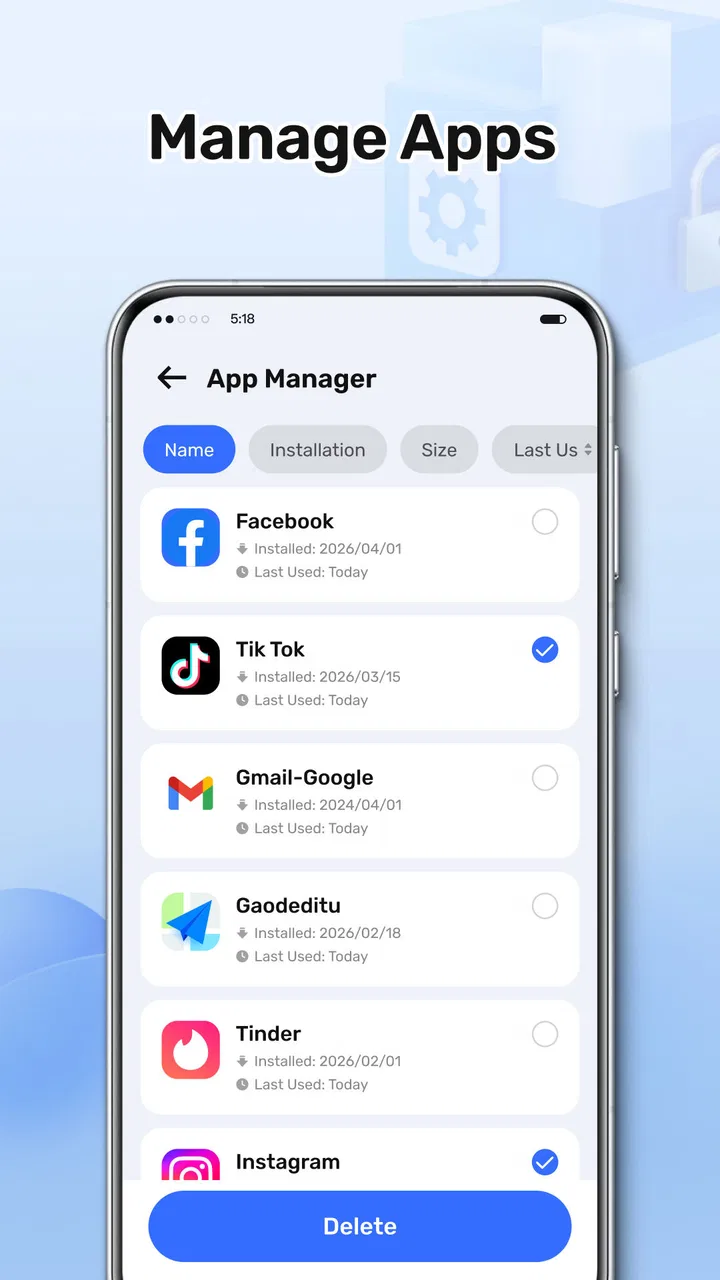
The app also helps organize installed apps, and this can be useful when a shared tablet has become crowded with games, learning tools, streaming apps, and one-time utilities. I would not begin by asking which apps are “bad” or “unnecessary.” Instead, I would group them by purpose and ask whether each one still has a role.
That approach avoids a common household mistake: removing an app because it has not been used recently, only to discover that it is needed for a seasonal activity or a school project. A better method is to mark the difference between “not used this week” and “no longer wanted.” CleanPro can help bring the list into view, but the household still needs that context.
One non-obvious benefit is that app organization can reveal duplication. A family may have several tools that perform similar jobs, such as multiple media players or file managers, because different people installed them at different times. Reviewing the list together can reduce confusion about which app should open a file. The trade-off is that standardizing too aggressively may remove someone’s preferred workflow, so I would keep the conversation practical rather than forcing one choice for everybody.
I would also be cautious with apps that store content locally. Removing a streaming app may be harmless, but removing it could also discard offline downloads. A game may keep progress on the device, and a creative app may contain drafts. CleanPro helps identify installed apps, yet the app list alone cannot tell you whether local content is valuable. Before uninstalling anything, I would open the app or ask its regular user what needs to be preserved.
Coordination is where the app becomes genuinely useful
In my experience, the strongest household use is not an individual cleanup session but a short, repeatable coordination routine. One person runs the scan, another identifies personal files, and an adult confirms changes when the device is shared with children. That division keeps CleanPro from becoming a source of accidental conflict.
A useful routine would be to review the largest files first, then look at installed apps, and finally check whether the device has enough room for the next immediate task. For example, before a family trip, I would make space for photos without deleting existing photos. Before a school deadline, I would verify that old downloads are not blocking the required document. The order matters because it keeps the review connected to a real need instead of encouraging random tidying.
I would also keep a short verbal record of decisions: “the old video was removed,” “the game stays,” or “the documents were moved before cleanup.” That may sound excessive, but it prevents another person from repeating the same investigation later. On a shared tablet, memory of what happened is almost as important as the storage recovered.
CleanPro’s average rating is 3.6 from around 272 ratings, with about 26 written reviews, and it has passed the 100K-install mark. I read that as a sign of a modestly established utility rather than a universally trusted household standard. I would try it for a specific storage problem and judge whether its presentation suits the family, instead of assuming that any cleaner can safely manage every device automatically.
Age, trust, and the limits of automated cleaning
The Everyone age context is reassuring for the app’s general audience, but age suitability should not be confused with permission to delete. A child may be perfectly capable of navigating a storage screen while still needing help to judge the importance of a file. In a household with teenagers, the issue changes again: they may want privacy around downloads and personal media, even when the device belongs to the family.
I would therefore establish two boundaries before using the app with younger users. First, no one deletes another person’s files without asking. Second, anything that looks personal, sentimental, or related to school or work is left alone until its owner confirms it. These rules are simple enough to remember and protect against the most likely mistake: confusing large with unnecessary.
This is also why I would not describe CleanPro as a complete parental-management solution. Its role is storage management and app organization. If a household needs detailed screen-time schedules, child profiles, content filtering, or account-level supervision, a dedicated operating-system feature or family-management service is a better fit. CleanPro can support a cleanup conversation, but it should not be expected to create boundaries that the app is not designed to provide.
Shared accounts create another complication. If several people use the same profile, the app may show a combined picture of storage rather than a clean separation by person. That is useful for finding the overall problem, but it makes ownership harder to judge. I would use the results as a household inventory, not as evidence that one person is responsible for the full device.
How it compares with built-in storage tools
Android already provides storage settings, so CleanPro has to justify the extra step. The built-in tools are often the better choice when you want a system-level overview, precise control over a particular app, or a direct route to settings. They are also the natural first stop when you are troubleshooting a system issue rather than organizing household clutter.
CleanPro makes more sense when you want a focused cleaning companion that brings large files and installed apps into a simpler review process. For someone who finds system settings scattered or intimidating, a dedicated tools app can make the task feel less technical. That convenience is valuable on a family tablet managed by someone who does not want to study every storage menu.
Compared with aggressive third-party cleaners, I prefer the more cautious mindset I would bring to CleanPro. I would not choose any cleaner simply because it promises to remove more. The best tool is the one that helps me understand what I am removing. If another app offers detailed backup workflows, duplicate detection, or stronger file previews, it may be better for a power user. If the goal is a readable storage check and app review, CleanPro is easier to approach.
The trade-off is that a focused cleaner may not solve every kind of storage problem. If the real issue is cloud synchronization, a hidden application cache, a damaged file system, or a device that is simply too small for the household’s media habits, cleaning can provide only temporary relief. In those cases, moving files to another location, changing download habits, or using a device with more capacity is the more durable answer.
Version, compatibility, and what I would expect in daily use
The current release is version 1.1.0, and it supports devices running Android 7.0 or newer. That gives it a reasonably broad reach for older Android hardware, including many family tablets that remain useful long after their original purchase. I would still check the device’s Android version before planning a household cleanup session, especially if the tablet has not received updates for a long time.
Because the app is free, I would evaluate it on clarity and control rather than expecting a premium support experience. The most important daily questions are practical: Can each person understand what is being shown? Can the owner distinguish a disposable download from an important file? Does the app make review easier than the phone’s existing settings? Those are the questions that determine whether it earns a permanent place on the device.
I would also avoid running any storage tool as a ritual with no purpose. A monthly review may be useful for a busy shared tablet, but the exact timing should follow the household’s habits. A device used mostly for streaming may need attention after large offline downloads, while a school tablet may need review around project deadlines. CleanPro is most helpful when connected to those real patterns.
Who should use it, and who should skip it?
I would recommend CleanPro to someone who wants a straightforward way to inspect large files and bring order to a crowded app list, especially on a shared Android device. It is a good match for households where one person handles maintenance but still wants other users involved in the decisions. It can also suit people who prefer a dedicated storage utility instead of navigating several system menus.
I would be more cautious about recommending it to a user who expects one-tap, fully automatic cleaning. That approach is risky on a shared device, and it misses the main value of reviewing ownership before removal. I would also point power users toward more specialized tools if they need advanced backup, duplicate-file analysis, or highly detailed file-management workflows.
It is not the right answer when the household’s main problem is privacy between separate users. A storage organizer cannot replace separate accounts or profiles. If each person needs a genuinely private space, the operating system’s account structure matters more than installing another cleaning utility. Likewise, if a child needs supervision features, use a tool designed for that purpose rather than expecting a storage app to provide them.
My household verdict
After using CleanPro as a storage and app-organization tool, I see it as a practical helper rather than a magic cleaner. Its strongest role is making a shared device’s clutter visible enough for people to discuss it. That is particularly useful when large files, forgotten downloads, and old apps have accumulated without anyone feeling responsible for the whole picture.
The app works best when paired with clear household boundaries: the file owner gets a voice, an adult confirms sensitive deletions, and no one treats size as proof that something is disposable. Those habits do more to prevent mistakes than any automatic cleanup promise. CleanPro can support the process, but it cannot supply the trust and coordination that a shared device requires.
For a free tools app from AJ IT Solutions, it offers a sensible starting point for everyday storage maintenance. I would install it when a family tablet needs a calmer review of large files and apps, then keep the built-in Android settings available for more precise system work. My recommendation is positive for careful, collaborative users; for anyone seeking private accounts, parental controls, or deep file-management features, a different solution should sit alongside—or replace—it.
FAQs for CleanPro
01What is CleanPro, and what does it do?
CleanPro is a mobile cleaning and optimization app designed to help users manage storage space and keep their devices more organized. Depending on the version and platform, it may scan for temporary files, duplicate photos, large files, unused applications, and other items that can consume storage. Before cleaning, review the results carefully so important personal files are not removed accidentally.
02Is CleanPro safe to use on an Android or iOS device?
CleanPro can be useful when downloaded from an official app store and used with its recommended settings, but users should still check the permissions it requests and read the privacy policy. Cleaning applications may need access to photos, files, or device storage to perform scans. Avoid unofficial APK files, and create a backup of important photos and documents before using automatic cleaning features.
03Can CleanPro really improve my phone’s performance?
CleanPro may help when your device is running low on storage, since removing unnecessary files can make it easier to install updates and save new content. However, it cannot solve every performance problem. It will not replace a system update, battery replacement, or professional repair, and clearing files does not guarantee a dramatic speed increase. Results depend on the device and the amount of removable data found.
04Does CleanPro delete photos, videos, or other personal files?
CleanPro may identify duplicate, blurry, oversized, or unwanted media for deletion, depending on the features available in your version. It should normally ask for confirmation before permanently removing anything, but users should not rely on automatic selections without checking them. Carefully review suggested files, protect important items, and remember that deleted content may not always be recoverable through the app.
05Is CleanPro free, and are there subscriptions or advertisements?
CleanPro’s pricing can vary by platform, region, and app version. The basic download may be free, while advanced tools, unlimited cleaning, ad removal, or additional optimization features can require a subscription or one-time purchase. Check the store listing and the in-app payment screen before starting a trial. Also review cancellation terms, because free trials may automatically renew if not canceled in time.
Pros
- Removes junk files quickly with a simple
- beginner-friendly interface.
- Helps identify large files that may be taking up unnecessary storage.
- Useful battery and memory tools are easy to access from the main screen.
- Scan results are grouped clearly
- making cleanup decisions more convenient.
- Runs on a wide range of Android devices
- including older models.
Cons
- Some features may require intrusive permissions to work properly.
- Cleaning recommendations can include files users may prefer to keep.
- Background tools may have limited impact on newer
- well-optimized phones.
- Advertising can interrupt the experience in the free version.
- Performance and available features may vary between device models.

CleanPro
Gallery